Windows11开启5G移动热点
一、现象描述与原因解析
问题现象
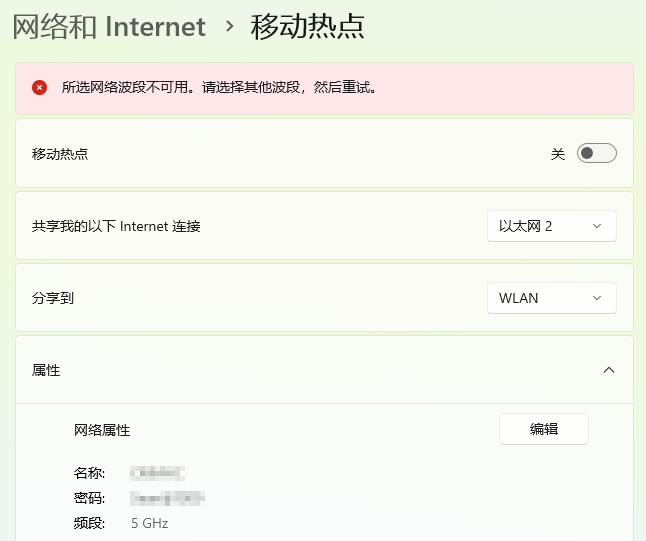
在 Windows 11 笔记本上,开启移动热点(设置 → 网络和 Internet → 移动热点 → 编辑 → 网络频带),如果选择 5GHz 频段,系统提示 “所选网络波段不可用”,但是无线显卡本身是支持5GHz频段的。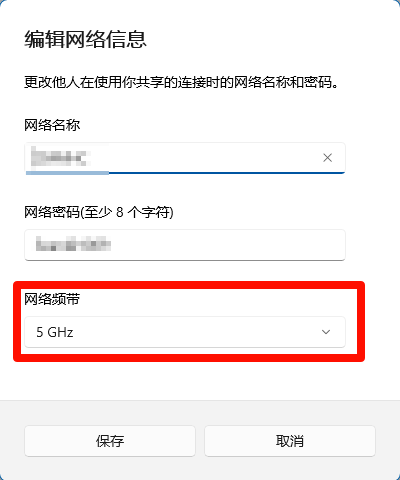
原因分析
Windows 11 的移动热点功能(基于 WLAN Hosted Network 或 Wi-Fi Direct Virtual Adapter)会动态检测无线网卡的射频环境。当未连接任何 Wi-Fi(如仅通过有线网络上网)时,系统无法确认当前环境是否允许使用 5 GHz 频段。受中国无线电法规限制(国家码 CN),系统默认屏蔽 DFS 信道(52–144),导致其尝试启用受限信道时触发”所选网络波段不可用”错误。关键机制:系统仅在检测到设备已成功连接 5 GHz 合规信道(如 UNII-3 的 149/153/157/161/165)后,才允许启用 5 GHz 热点。因此,必须先连接 5 GHz Wi-Fi(保持连接),系统方能”学习”到环境合规性,后续即可开启 5 GHz 热点并断开原 Wi-Fi。
| UNII频段 | 频率范围 | 信道范围 | 中心频率 | 中国法规限制 | 是否可用 |
|---|---|---|---|---|---|
| UNII-1 | 5.15~5.25 GHz | 36, 40, 44, 48 | 5180, 5200, 5220, 5240 MHz | 仅限室内使用 | ✅ 可用(但仅限室内) |
| UNII-2A | 5.25~5.35 GHz | 52, 56, 60, 64 | 5260, 5280, 5300, 5320 MHz | 仅限室内使用 | ✅ 可用(但仅限室内) |
| UNII-2C | 5.47~5.725 GHz | 100-144(以4为步长) | 5500-5720 MHz | 完全不可用(中国缺失) | ❌ 不可用 |
| UNII-3 | 5.725~5.825 GHz | 149, 153, 157, 161, 165 | 5745, 5765, 5785, 5805, 5825 MHz | 所有场景可用 | ✅ 可用(推荐使用) |
二、系统服务检查与显卡配置
检查系统服务
- 按 Win + R 输入 services.msc
- 确保 WLAN AutoConfig 和 Internet Connection Sharing (ICS) 服务正在运行
无线网卡设置
笔记本设置(设备管理器 > 网络适配器 > Intel Wi-Fi AX211 > 属性 > 高级)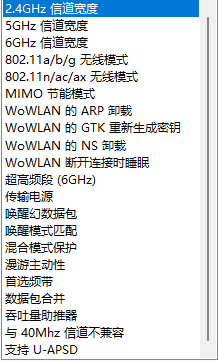
以下是结合场景需求的必要设置项:
1. 首选频带
- 适用场景:希望无线网卡优先连接5GHz或6GHz频段(避开2.4GHz频段的设备拥挤、干扰问题)。
- 说明:默认可能无频带优先级(或优先2.4GHz),手动设置“首选5GHz/6GHz”后,网卡会优先搜索并连接该频段信号。
2. 超高频段(6GHz)
- 适用场景:当无线路由器支持 Wi - Fi 6E(即支持6GHz频段) 时,需开启此选项。
- 说明:6GHz频段可提供更高网速、更低延迟,但需路由器硬件及固件支持6GHz,否则默认关闭(因6GHz需生态支持,普通家庭路由器可能不开放该频段)。
3. 唤醒幻数据包
- 适用场景:需通过**局域网唤醒(Wake - on - LAN)**远程控制处于待机/关机状态的电脑(如远程访问家庭电脑)。
- 说明:默认可能关闭,开启后允许特定网络数据包唤醒设备(需配合路由器设置“转发唤醒包”功能)。
4. 漫游主动性
- 适用场景:
- 若移动中(如在房间走动)发现“信号弱但网卡不主动切换热点,导致卡顿/网速慢”,可调高数值(如3 - 4,数值越高切换越积极);
- 若“频繁无故切换热点导致短暂断线”,可调低数值(如1 - 2,降低切换积极性)。
- 说明:默认为“中等”(数值2 - 3),若无网络体验问题无需调整。
5. 信道宽度(2.4GHz频段)
- 适用场景:2.4GHz频段干扰严重(如老旧小区、多路由器密集区域)。
- 说明:默认“自动”可能选择40MHz,但干扰多时易断连;手动固定为20MHz可提升稳定性(5GHz/6GHz频段默认“自动”一般无需改,除非有特殊速度/稳定需求)。
其他说明
“无线模式、MIMO、节能卸载(ARP/GTK/NS)、传输电源、数据包合并、吞吐量助推器、与40MHz信道不兼容、U - APSD支持”等选项,默认设置已适配多数场景,无需手动干预,驱动会自动协商最优参数。
当移动
总结:仅当遇到6GHz路由器适配、远程唤醒、频段优先级、漫游切换异常、2.4GHz干扰严重等问题时,需针对性调整上述5类设置;其他选项保持默认即可获得最佳兼容性与性能。
三、开启 5GHz 移动热点
🔧 步骤 1:配置路由器为合规 5GHz 信道(必须!)
- 打开浏览器,输入路由器管理地址(如
192.168.1.1)。 - 登录后,进入 无线设置 > 5GHz 频段。
- 将信道手动设置为:
✅ 149(推荐,干扰最少)或 153/157/161/165
❌ 避免:自动选择、52–144 信道(DFS 信道)。 - 保存设置并重启路由器。
💡 为什么必须?这是让 Windows 识别合规环境的关键!
示例:TP-Link 路由器设置路径:无线设置 > 5GHz > 信道:149
📱 步骤 2:连接合规 5GHz Wi-Fi(保持连接)
- 在 Windows 11 任务栏右下角点击 网络图标。
- 选择您的 5GHz Wi-Fi 网络(名称中含“5G”或“5GHz”)。
- 输入密码连接。
- 保持连接状态,不要断开!(系统需此过程学习合规环境)
✅ 此步骤是“解锁”5GHz 热点的关键!
检查:手机连接该 Wi-Fi 后,在 Wi-Fi 设置中查看“频段”是否显示“5GHz”
📡 步骤 3:开启 5GHz 移动热点
- 打开 设置 > 网络和 Internet > 移动热点。
- 点击 “编辑”(位于“网络频带”下方)。
- 在下拉菜单中选择 “5 GHz” → 点击 “保存”。
- 打开 移动热点开关。
✅ 系统此时已识别为合规环境,5GHz 选项不再灰显!
📱 步骤 4:断开第一步的 Wi-Fi 连接
- 在任务栏网络图标中,点击 当前连接的 5GHz Wi-Fi。
- 选择 “断开”。
- 移动热点将保持开启状态,无需重新设置!
✅ 验证:用手机连接热点,进入手机 Wi-Fi 设置 → 查看“频段”是否显示 5GHz。
三、总结
| 步骤 | 作用 |
|---|---|
| 1. 路由器设为信道 149 | 创建合规 5GHz 环境(中国允许的信道) |
| 2. 连接该 Wi-Fi | Windows 学习到环境合规 → 临时解锁 5GHz 热点 |
| 3. 开启 5GHz 热点 | 系统基于学习到的环境,允许使用 5GHz |
| 4. 断开 Wi-Fi | 系统保留“合规环境”状态 → 热点持续使用 5GHz(无需重连) |
✨ 最终效果:
Windows 11 笔记本只要不关机即可使用 5GHz 移动热点,重新开机后需要重新执行WLAN连上5GHz热点→开启5GHz移动热点→断开WLAN5GHz热点的过程。